

Note
Go to the end to download the full example code.
Tree view menu#
This example demonstrates the use of a tree view menu to manage the visibility of components in an encased motor block assembly. The tree menu allows users to interactively show or hide different parts of the assembly.
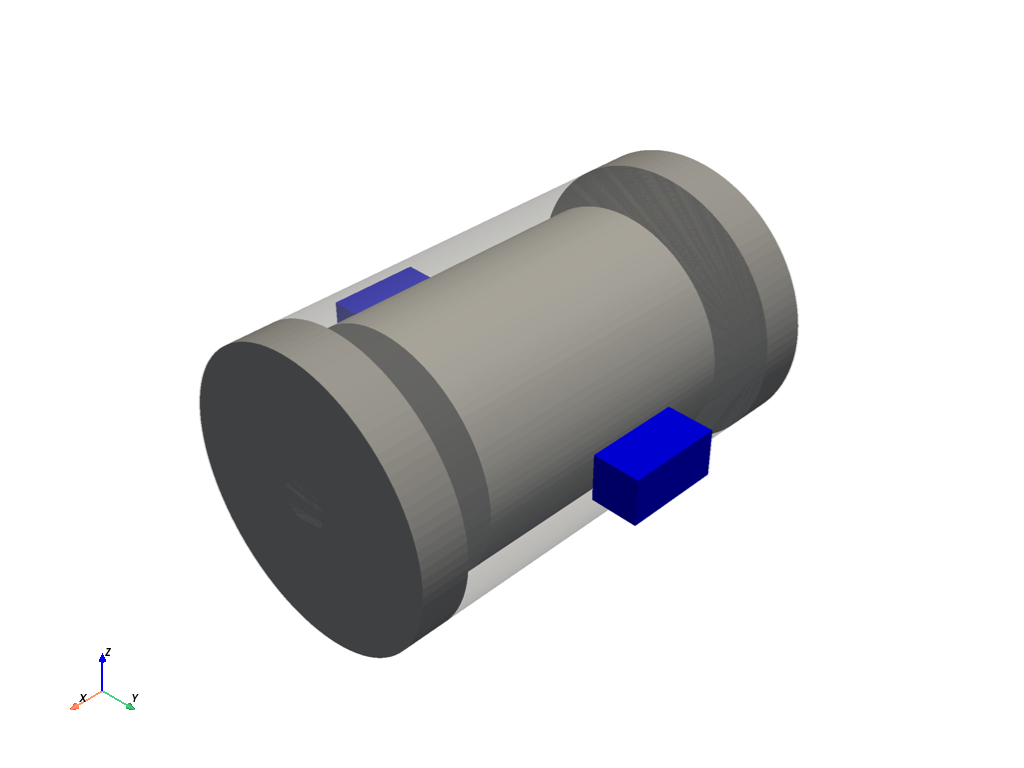
================================================================================
                         ENCASED MOTOR BLOCK ASSEMBLY
================================================================================

HIERARCHY:
  Motor Housing (semi-transparent)
    ├─ Stator
    │   └─ Rotor
    │       ├─ Shaft
    │       ├─ Front Bearing
    │       └─ Rear Bearing
    ├─ Front End Cap
    ├─ Rear End Cap
    ├─ Top Mounting Bracket
    └─ Bottom Mounting Bracket

TREE MENU (Right side):
  - Click eye icons to show/hide components
  - Hiding a parent hides all children
  - Example: Hide 'Motor Housing' to hide entire assembly
  - Example: Hide 'Rotor' to hide rotor, shaft, and bearings

USE CASES:
  1. Hide housing to see internal components
  2. Hide stator to see only rotor assembly
  3. Hide brackets to focus on motor internals
  4. Hide individual bearings or shaft

CONTROLS:
  - Toggle button (bottom left) = Show/hide tree menu
  - Eye icons in menu = Toggle component visibility
================================================================================


[]
import pyvista as pv
from ansys.tools.visualization_interface import Plotter, MeshObjectPlot
from ansys.tools.visualization_interface.backends.pyvista.pyvista import PyVistaBackend


# Simple helper class to hold component names
class MotorComponent:
    """Simple class to hold motor component name."""
    def __init__(self, name: str):
        self.name = name


# Create Motor Housing (outer casing)
housing = MeshObjectPlot(
    MotorComponent("Motor Housing"),
    pv.Cylinder(center=(0, 0, 0), direction=(1, 0, 0), radius=3, height=8)
)

# Create Stator (fixed part inside housing)
stator = MeshObjectPlot(
    MotorComponent("Stator"),
    pv.Cylinder(center=(0, 0, 0), direction=(1, 0, 0), radius=2.5, height=6)
)

# Create Rotor (rotating part)
rotor = MeshObjectPlot(
    MotorComponent("Rotor"),
    pv.Cylinder(center=(0, 0, 0), direction=(1, 0, 0), radius=1.8, height=5.5)
)

# Create Shaft (central rotating shaft)
shaft = MeshObjectPlot(
    MotorComponent("Shaft"),
    pv.Cylinder(center=(0, 0, 0), direction=(1, 0, 0), radius=0.5, height=10)
)

# Create Bearings
bearing_front = MeshObjectPlot(
    MotorComponent("Front Bearing"),
    pv.Cylinder(center=(3.5, 0, 0), direction=(1, 0, 0), radius=0.8, height=0.5)
)

bearing_rear = MeshObjectPlot(
    MotorComponent("Rear Bearing"),
    pv.Cylinder(center=(-3.5, 0, 0), direction=(1, 0, 0), radius=0.8, height=0.5)
)

# Create End Caps
end_cap_front = MeshObjectPlot(
    MotorComponent("Front End Cap"),
    pv.Cylinder(center=(4.5, 0, 0), direction=(1, 0, 0), radius=3, height=1)
)

end_cap_rear = MeshObjectPlot(
    MotorComponent("Rear End Cap"),
    pv.Cylinder(center=(-4.5, 0, 0), direction=(1, 0, 0), radius=3, height=1)
)

# Create Mounting Brackets
bracket_top = MeshObjectPlot(
    MotorComponent("Top Mounting Bracket"),
    pv.Box(bounds=(-1, 1, 3, 4, -0.5, 0.5))
)

bracket_bottom = MeshObjectPlot(
    MotorComponent("Bottom Mounting Bracket"),
    pv.Box(bounds=(-1, 1, -4, -3, -0.5, 0.5))
)

# Build hierarchy - Housing contains all internal components
housing.add_child(stator)
housing.add_child(end_cap_front)
housing.add_child(end_cap_rear)
housing.add_child(bracket_top)
housing.add_child(bracket_bottom)

# Stator contains rotor
stator.add_child(rotor)

# Rotor contains shaft and bearings
rotor.add_child(shaft)
rotor.add_child(bearing_front)
rotor.add_child(bearing_rear)

# Create plotter with picking enabled (automatically adds tree menu)
backend = PyVistaBackend()
pl = Plotter(backend=backend)

# Plot all components with different colors
pl.plot(housing, color="lightgray", opacity=0.3)  # Semi-transparent housing
pl.plot(stator, color="darkgray")
pl.plot(rotor, color="orange")
pl.plot(shaft, color="silver")
pl.plot(bearing_front, color="gold")
pl.plot(bearing_rear, color="gold")
pl.plot(end_cap_front, color="darkgray")
pl.plot(end_cap_rear, color="darkgray")
pl.plot(bracket_top, color="blue")
pl.plot(bracket_bottom, color="blue")

print("\n" + "="*80)
print(" " * 25 + "ENCASED MOTOR BLOCK ASSEMBLY")
print("="*80)
print("\nHIERARCHY:")
print("  Motor Housing (semi-transparent)")
print("    ├─ Stator")
print("    │   └─ Rotor")
print("    │       ├─ Shaft")
print("    │       ├─ Front Bearing")
print("    │       └─ Rear Bearing")
print("    ├─ Front End Cap")
print("    ├─ Rear End Cap")
print("    ├─ Top Mounting Bracket")
print("    └─ Bottom Mounting Bracket")
print("\nTREE MENU (Right side):")
print("  - Click eye icons to show/hide components")
print("  - Hiding a parent hides all children")
print("  - Example: Hide 'Motor Housing' to hide entire assembly")
print("  - Example: Hide 'Rotor' to hide rotor, shaft, and bearings")
print("\nUSE CASES:")
print("  1. Hide housing to see internal components")
print("  2. Hide stator to see only rotor assembly")
print("  3. Hide brackets to focus on motor internals")
print("  4. Hide individual bearings or shaft")
print("\nCONTROLS:")
print("  - Toggle button (bottom left) = Show/hide tree menu")
print("  - Eye icons in menu = Toggle component visibility")
print("="*80 + "\n")

# Show the plot
pl.show()
Total running time of the script: (0 minutes 0.321 seconds)